
As professional women balancing corporate careers, home management, and fitness goals, our mental bandwidth is often at capacity. When you decide to prioritize your health, tracking macros shouldn’t feel like another stressful administrative task. Instead, think of MyFitnessPal (MFP) as a powerful, data-informed companion—a tool that helps you move from confusion to clarity.
Our goal here isn’t to be tethered to an app for life. It’s to gather the data you need to learn exactly what your body requires to feel strong, energized, and capable, so you can eventually graduate to intuitive, informed living.
Phase 1: The Foundation (Getting It Right)
Before you start logging, you must set the stage for success. Accuracy at the start prevents frustration later and ensures you are working with reliable data.
- The Setup: Your first step is ensuring your inputs are configured for your specific goals. A well-configured account accounts for your activity level and goals accurately. For a step-by-step walkthrough, see my guide on How to Set Up MyFitnessPal Correctly.
- Free vs. Premium: Many beginners ask if they need to pay for the upgrade. Start with the free version; you can always scale up later if you need specific features. Check out my comparison in MyFitnessPal Premium vs. Free to see which makes sense for your current needs.
- Avoiding “Tracking Fatigue”: It is easy to get bogged down in the numbers. To avoid the most common traps that lead to burnout, read Common MyFitnessPal Mistakes.
Phase 2: Mastering the Workflow (The “Quietly Well” Efficiency)
The secret to a sustainable tracking routine is reducing friction. You don’t need to reinvent the wheel every single day. If you eat many of the same foods, you should leverage the app’s ability to save time and automate your tracking.
The Power of “Saved Meals”
This is my absolute favorite feature in the app. If you eat a consistent breakfast or have a staple family dinner, you can log the entire thing with one click.
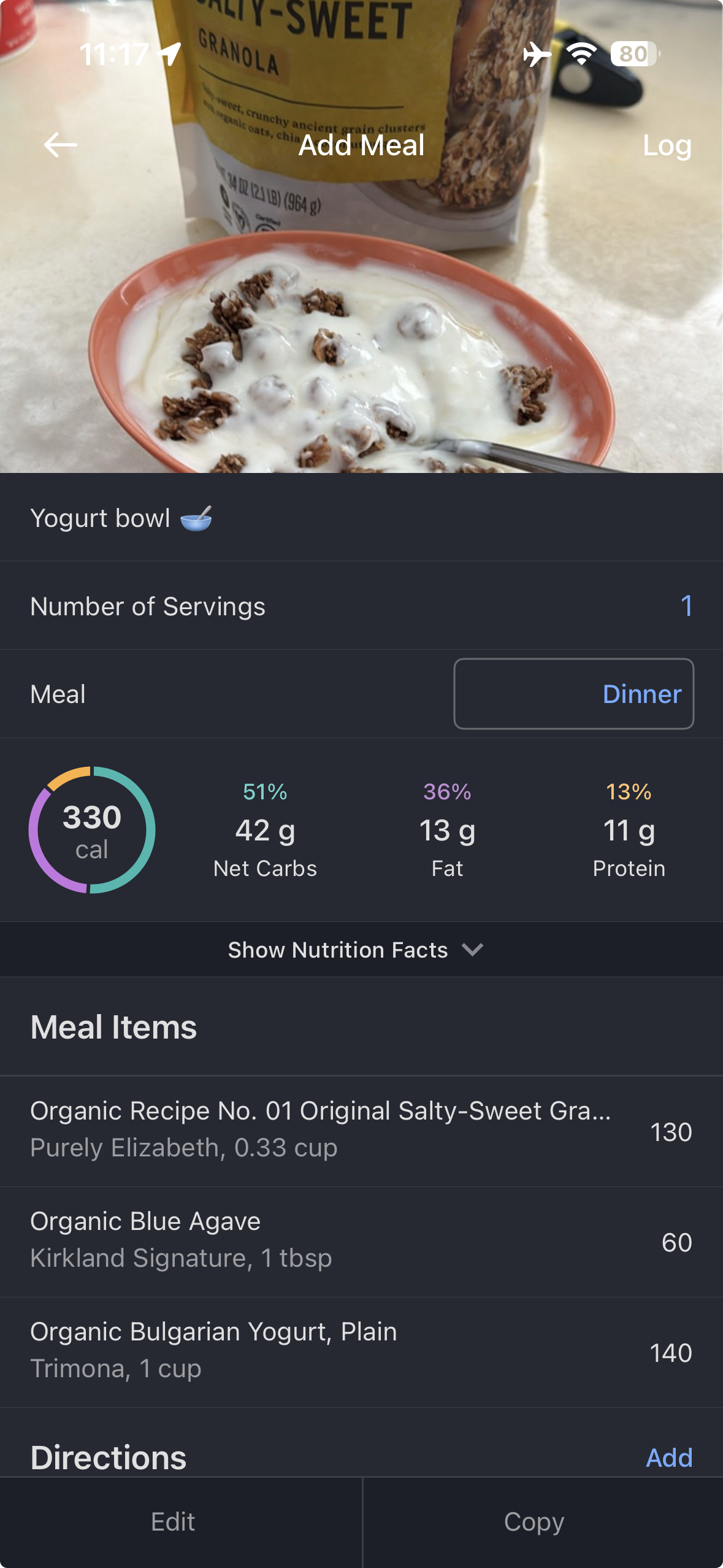
Take a look at the image below to see exactly how I handle my daily breakfast yogurt bowl.

By saving this as a custom “Meal” in the app, I don’t have to search for the yogurt, agave, and granola individually every morning. I simply select “Yogurt bowl,” and my 330-calorie meal is logged instantly.
Pro-Tip: Whether it’s a simple yogurt bowl or a complex family-sized lasagna soup, adding it once as a “Meal” saves you massive amounts of time. You can learn exactly how to do this in my guide on [How to Create Custom Recipes].
Leverage Automation
You are already managing a team and a household—let your tech do the heavy lifting. Syncing your fitness trackers with MFP allows your workouts to automatically adjust your daily calorie targets, ensuring you are fueling properly for your activity levels. For help choosing the right tech, see my list of the [Best Fitness Apps That Sync with MyFitnessPal].
Phase 3: Listening to Your Body (The “Why”)
Ultimately, we track to learn. Use MFP to answer the questions that matter:
- Are you under-fueling for your high-intensity work weeks?
- Are you getting enough protein to support your muscle recovery?
- How do certain foods impact your energy levels throughout the workday?
Treat this app as a foundational tool for building long-term nutrition literacy. Once you have “locked into” an understanding of how your body responds to fuel, you may find that you no longer need the app daily. That is the ultimate goal of the Quietly Well approach: moving from external data tracking to internal body wisdom, where you can make confident, autonomous health decisions.
Your Roadmap to Success
Ready to dive deeper? Bookmark this page and explore these specific resources as you navigate your journey:
- For the Busy Professional: [How to Log Restaurant Meals], [How to Track Alcohol], and [How to Meal Prep with MyFitnessPal].
- For the Athlete: [How to Hit Your Protein Goals] and [Best Foods to Stay Within Your Calories].
- The Big Picture: [MyFitnessPal for Beginners Over 40] and [Weekly Check-In Strategy].
Ready to start? Download my Rooted Pantry Swap Guide to ensure the food you are logging is high-quality, whole-food fuel that supports your long-term wellness.
I recommend MyFitnessPal not because it’s the only way to eat, but because it is the most effective tool I’ve found for helping professional women decode their nutritional needs. By using features like ‘Saved Meals’, we turn a complex data task into a 30-second daily routine. It’s about building the knowledge base you need to eventually move beyond the tracker, fully in tune with your body’s requirements.
Looking for more tips, check out The Ultimate Beginner’s Guide to MyFitnessPal